Guides
Welcome to Your New Home: Getting Started with Topupmeters

March 9, 2026

Dominic Clegg

If your new home uses a topup prepay smart meter, here is everything you need to know to get started.
First, it is helpful to know that Topupmeters is a payments platform, not your energy supplier. Your energy is actually supplied by an intermediary, such as your landlord or property manager.
How to Top Up Your Meter
Topping up is completely fee-free; you only pay the price of the electricity and a standing charge set by the bill payer. To make a payment:
- Visit https://payments2.topupmeters.co.uk or scan the QR code to go to the payment site.
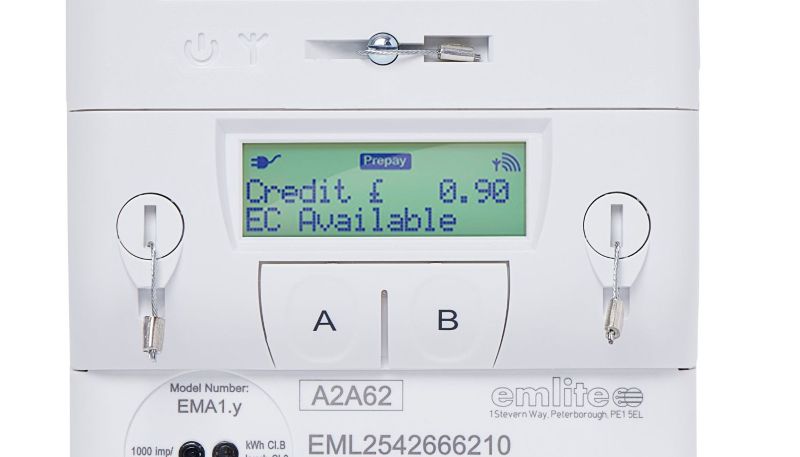
- Enter your meter's serial number, which starts with EML.
- Enter the 5 digit ID code exactly as shown on the front of the meter.
- Click 'Next' to topup as a guest and follow the steps to make your payment.
While you can checkout as a guest, you can also sign up for an account to store your meter details and payment method for faster topups next time. An account also lets you keep track of energy usage, payment history, and get alerts. For instance, low credit alerts are sent by email when your balance falls below £10.
Managing Your Supply
Topups are sent over the mobile phone network and normally reach the meter instantly. If you have topped up but the power is not on, simply press 'A' or 'B' several times to reset the supply. In rare cases where the phone signal is poor, you can manually enter the 20 digit topup code that is sent by email after topping up.
If you ever run low on funds, simply press B three times to start Emergency Credit. This is normally set to £5 or another amount set by your landlord. Finally, you can tap the 'A' button at any time to scroll the display and view your meter readings, tariffs, and daily standing charges.
Emergency Credit
If your balance drops to zero and you cannot top up immediately, you can activate your meter's emergency credit by pressing B three times. This provides a temporary buffer to keep your power running until you have a chance to make your next top-up.
Who to Contact
- Contact Topupmeters: Reach out to us if you need help making top-ups, navigating our service, using the meter, or have a question about a particular payment.
- Contact Your Landlord: Because your landlord owns and operates the meter as an intermediary with the main supply, you must contact them for questions about your energy tariff, pricing, or any electrical faults.
When You Move Out
- Simply stop topping up your meter.
- If you created an online account, you can delete it yourself from the Profile page, or you can ask us to delete it for you.
OTHER BLOGS
Latest Articles